Introduction
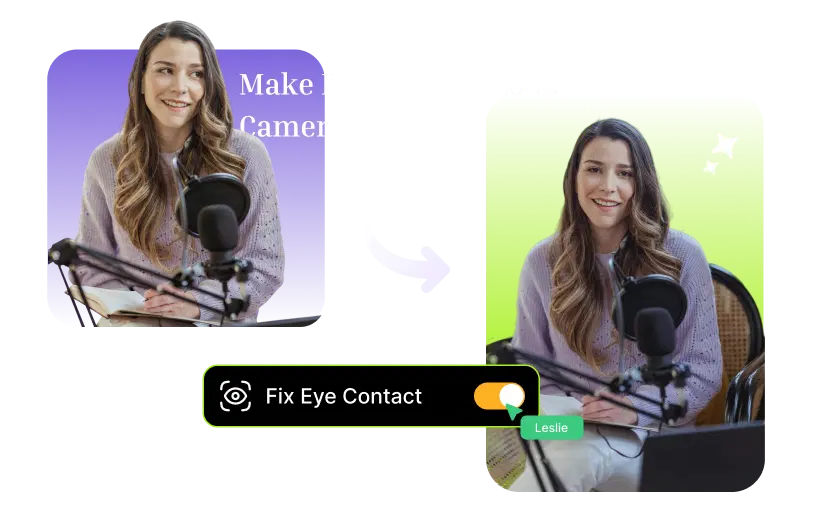
AI eye correction technology can detect when your gaze has shifted off-camera and, in post-production, subtly redirect it to look straight at the lens, with no retakes required. And that's exactly what we'll be talking about in this blog: the importance of eye contact, why it's so hard to get right on camera, and how VFX AI's Eye Correction feature is resolving this issue.
Why Does Eye Contact Matter So Much in Videos?
When you watch someone speak directly to the camera, something psychological happens. You feel like they're talking to you, not the screen. This is what turns you from a passive viewer into an engaged one, and what makes the difference between a person watching your video to the end or scrolling past it in a matter of seconds.
Research in social psychology has shown time and again that direct gaze significantly affects how trustworthy and credible a speaker is perceived. And when the person on the screen is looking at the camera, this is what happens in your brain: it's like they're having a real-time conversation with you, with the same neural responses.
For content creators, marketers, coaches, and business owners making videos, this isn't just about aesthetics. It directly impacts watch time, engagement, and your audience's trust in what you're saying.
Why Is It So Hard to Maintain Eye Contact on Camera?
Even experienced creators and professional speakers have problems with making eye contact with the camera. It's not a skill problem; it's a problem with instinct and setup. Your eyes are naturally attracted to information, and in most cases, the information (your script, your image, your phone) is never in front of the lens.
You're Reading from a Script or Teleprompter
One of the most common reasons people have trouble making eye contact with the camera is when they're reading from a script. Even if you've placed your script as close to the lens as you possibly can, your eyes are naturally drawn to the text on the screen, and this is visible on camera. Your viewers may not be able to tell you're reading, but they can definitely sense the difference in engagement.
Teleprompters are helpful, but they're expensive, take time to set up, and even then, there's a small gaze drift in most videos, particularly if you haven't been trained on teleprompters extensively.
You're Watching Yourself on Screen While Recording
Self-monitoring is a completely natural impulse. You want to make sure you're framed well, your hair is styled correctly, and you're not leaning too far to one side. However, if you're self-monitoring, you're looking at your screen, which means you're looking away from the camera.
This is a particularly common issue when recording on a smartphone or a laptop, since the screen and camera are close but still far enough apart to cause a gaze drift.
Camera Placement and Eye-Level Mismatch
The position of your camera relative to your eyes plays a huge part in whether your eye contact looks natural. When your camera is positioned below your eye level, it can make it appear that your eyes are always cast downward, which may give the impression that you're not interested in the conversation or that you're submissive.
On the other hand, a camera positioned too high will give your video an awkward look, like your eyes are cast upward.
The best position for your camera is at eye level with your face directly in front of the lens. However, even with the best camera position, it's inevitable that your eyes will drift from reading the script or from self-monitoring. This is why AI eye correction becomes your best backup.
Also Read: How to Create a Brand Kit with AI in 2026
What Is AI Eye Correction and How Does It Work?
AI eye correction, also known as AI gaze correction and AI eye contact correction, is a post-production video editing tool that uses artificial intelligence to detect when your eyes are not cast toward the camera lens and applies corrections so they appear to be in front of the lens.
This is one of the most accessible and powerful AI video tools for creators today, yet it's also one of the most under-discussed. Most people don’t even know this exists, giving early adopters a huge advantage in video quality.
How AI Detects and Corrects Your Gaze
There are three steps in this process:
- Detection: The AI analyzes each frame of your video to identify facial features, including the positions of your eyes, pupils, and iris.
- Analysis: The software determines the precise location of your gaze relative to the camera lens.
- Correction: The software adjusts the eye area so that your eyes appear focused on the camera.
The end result is a video in which you appear to be making confident eye contact with the viewer, even if you spent half the video staring at the script in front of you.
Pro Tip: Don't think of AI eye correction as a replacement for good filming practices. It's meant to fix those inevitable little breaks in eye contact that occur even with your best efforts. It's your safety net, rather than a replacement for setup.
How to Edit the Eyes in Videos Using VFX AI
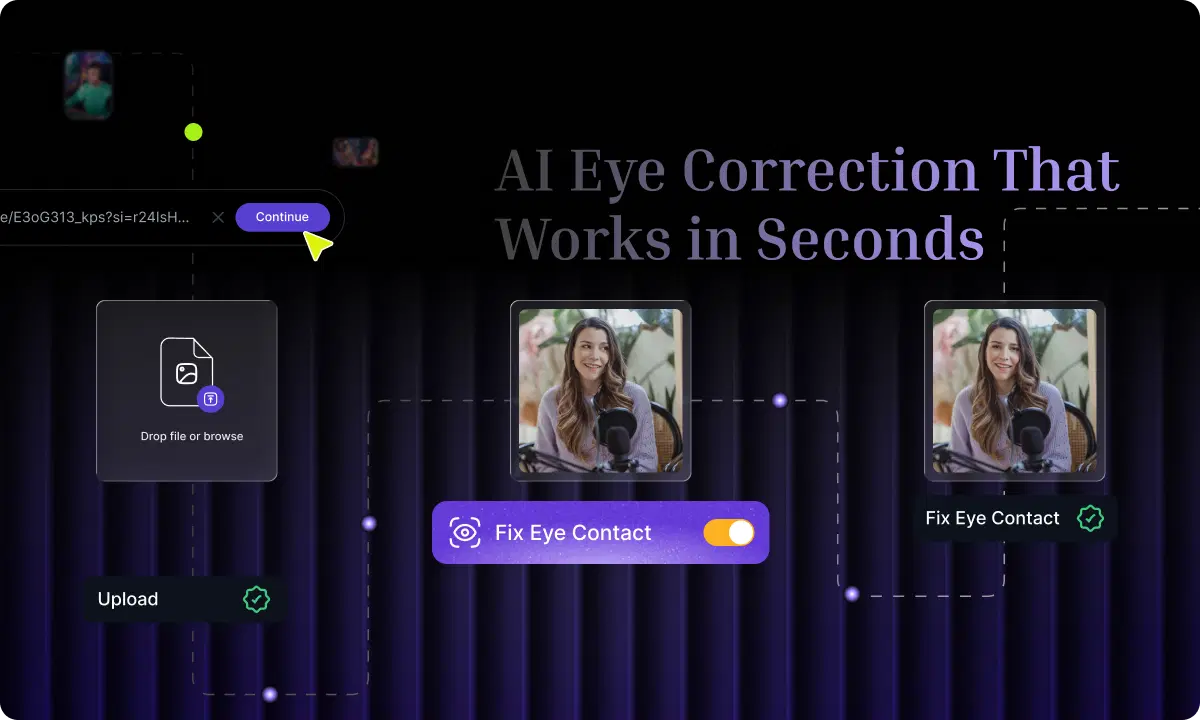
The VFX AI Eye Correction feature is integrated directly into the platform, so you don't need to install any additional plugins or edit your video frame by frame or anything else. To get started, you'll want to follow these steps:
Step 1: Upload Your Video to VFX AI
To get started, you'll want to log in to your VFX AI account and then upload your raw video file. VFX AI accepts all standard video formats, so you don't need to worry about anything special in this regard. You can simply upload your video exactly as you recorded it.
Step 2: Enable Eye Correction with One Click
In the AI Tools window, select Eye Correction. The VFX AI tool will scan the video and automatically correct all deviations in eye gaze. This process will take a fraction of the time it would take to manually review the video and edit the areas that need correction.
Step 3: Preview, Adjust, and Export
After the eye correction process is complete, the video will be ready for previewing in the VFX AI editor (studio). You can scrub the video to check the quality of the eye correction and make any necessary adjustments. Once the video is ready, it can be exported in the desired format and resolution, or shared directly on Instagram, YouTube, TikTok, LinkedIn, and more using the VFX AI's built-in Social Publisher.
Try it free: VFX AI offers an Eye Correction feature through their VFX AI platform itself. You can try it out by uploading your first video and see the difference yourself.
Who Should Use AI Eye Contact Correction?
While AI eye correction may be most important to those who struggle with nerves or camera insecurities, it's also a valuable video production tool for anyone making videos and wants to make them look more polished and professional without having to reshoot them.
Content Creators and YouTubers
Are you a YouTuber or content creator? Do you make vlogs or review videos, or provide commentary for sports or videos? Do you read notes, respond to comments on screen, or even change your camera angles in the middle of a video? These all cause gaze breaks in eye contact. Eye correction automatically cleans these up, making every video feel polished and professional.
Coaches, Educators, and Course Creators
For faculties conducting online classes, eye contact is directly related to students' engagement and level of connection with the teacher. A teacher's apparent direct eye contact with a student via a screen replicates a real-life scenario, which enhances students' understanding, trust, and course completion. Eye correction is useful for teachers to maintain this connection with students if they want to refer to their notes or a course plan while recording a video.
Marketing Teams and Business Videos
Marketing teams often use webinars, product demos, and sales videos, and in all such instances, a speaker's credibility is crucial. A speaker with apparent eye contact is perceived as confident and trustworthy, both of which directly impact a potential customer's conversion rate. Marketing teams benefit from AI eye correction by enabling them to publish their videos more quickly, without having to reshoot even if a speaker looks at their notes.
Podcasters Repurposing Video Clips for Social Media
The nature of podcast recordings is that the speaker and their guest are always looking at each other, at their notes, or at their recording equipment. When these recordings are repurposed as Reels, Shorts, or TikTok videos, the lack of eye contact becomes immediately apparent. AI eye correction can turn informal interview recordings into intentional, engaging videos that work much better for social media.
Also Read: 10 Best AI Video Editing Software for Beginners in 2026
How Do You Improve Eye Contact While Recording?
Good recording practices are always better than relying on post-production fixes. These tips are most effective when combined with AI eye correction. Use these tips to reduce the eye-contact problem, then let the AI correct the rest.
Place a Small Marker Next to Your Camera Lens
A colored sticker, a small arrow drawn on a sticky note, or even a small piece of tape placed right next to your camera lens provides a natural point of focus for your eyes. Your brain was built to look at things, and having something physically close to your camera lens helps train your eyes to look in the right spot without any effort on your part.
Move Your Script as Close to the Lens as Possible
If you're reading from a script, try to position it so it rests just above or right next to your camera lens. The closer your script is to your lens, the less you'll notice any gaze drift in your finished video. Large font sizes are helpful too. Large font sizes minimize the amount of eye movement necessary to read each line of text.
Record at Eye Level
Place your camera at exact eye level for every video recording session. You may use books, a monitor stand, or a proper tripod for this. This single adjustment will eliminate the most conspicuous forms of off-camera eye movement, namely, the constant look-down that makes even the most confident speaker appear unsure of himself.
Use VFX AI's Eye Correction As Your Safety Net
Even with all the tips applied, some eye movement will still be present. This is perfectly normal and expected. As a part of your post-recording process, it is recommended that you utilize the Eye Correction tool by VFX AI, the same way you'd apply audio enhancement or captions. This takes mere seconds and makes a tremendous difference in the quality of your video content.
The VFX AI Eye Correction tool is just one part of a whole AI video editing platform designed to help video creators, marketers, coaches, and teams produce high-quality video content quickly and efficiently. Simply upload your video, and with the help of AI, you'll be able to make your content produce like it was recorded flawlessly from the very beginning.