VFX AI vs InVideo
VFX AI and InVideo are both AI video platforms designed to help you create and repurpose content faster, but they differ in depth, workflow, and who they are built for. This comparison breaks down where each tool excels so you can choose the right AI video editor based on your content strategy, team size, and growth goals.

Pick VFX AI if you:
- Want cinematic, scroll-stopping social videos and ad creatives.
- Need end-to-end automation from creation to publishing.
- Manage multiple brands, clients, or campaigns.
- Need built-in scheduling and publishing.
- Create high-volume content for social media growth.

Pick InVideo if you:
- Prefer script-to-video over visual-first, motion-design workflows.
- Creator or small team comfortable with template-based editing.
- Need quick AI-generated videos from simple prompts.
- Primarily use stock footage-based content.
- Create UGC-style ads and promotional videos.
Biggest Difference
The biggest difference between VFX AI and InVideo is that VFX AI focuses on automated video production workflows and distribution, while InVideo focuses on AI-assisted video creation using prompts and templates.
What VFX AI Does Differently
VFX AI is built around automation-first content production rather than manual editing. It treats your content system as a pipeline, not just a single video export.
Publishing Automation
Unlike traditional video generators, VFX AI includes publishing and scheduling capabilities directly inside the platform.
- Multi-platform publishing
- Automated content distribution
- Social-ready formatting
- Reduced manual workflow
Automated Video Workflows
Instead of relying on templates and scene-by-scene editing, VFX AI automates the creative process.
- Automated transitions
- Smart visual enhancements
- AI-generated captions
- Campaign-ready outputs
Scalable Brand Consistency
Maintaining consistent branding across dozens or hundreds of videos becomes difficult as content volume increases.
- Logo automation
- Typography controls
- Brand colors
- Reusable visual systems
Multi-Platform Content Repurposing
A single piece of content can be transformed into multiple formats optimized for different social media channels.
- Instagram & TikTok Reels
- YouTube Shorts
- LinkedIn & Video ads
- Social campaigns
Visual-First Content Creation
While InVideo is prompt and script-first, VFX AI is visual-first, optimized for storytelling and platform-native creative.
- Motion design systems
- Visual storytelling optimization
- Platform-native formatting
- Scroll-stopping creative outputs
What InVideo Does Differently
InVideo is built as an AI-powered script-to-video platform that generates videos from ideas, prompts, and text for marketers and creators.
AI Script-To-Video Generation
InVideo lets you input a prompt, script, or idea and then automatically builds a full video with scenes, visuals, and AI narration.
- Natural language prompts
- AI-generated scripts
- Template-driven workflows
- Good for marketing promos
Templates And Voiceovers
InVideo leans heavily on templates, stock libraries, and AI voice to speed up production. You can access a number of templates.
- Large library of templates
- Stock video, images, and music
- AI voiceover and voice cloning
- Build footage from scratch
Timeline Workflow
Compared to VFX AI's outcome-driven workflow, InVideo still feels like a video editor layered with AI assistance.
- Scene and timeline-based editing
- Manual control over pacing and text
- Flexible for users who like to tweak
- Best for creators with light editing
Massive Stock Media Library
One of InVideo's advantages is access to a large collection of stock assets. This makes it easy to create marketing videos.
- Stock videos & Images
- Music
- Templates
- Pre-built creative layouts
How to Switch from InVideo to VFX AI
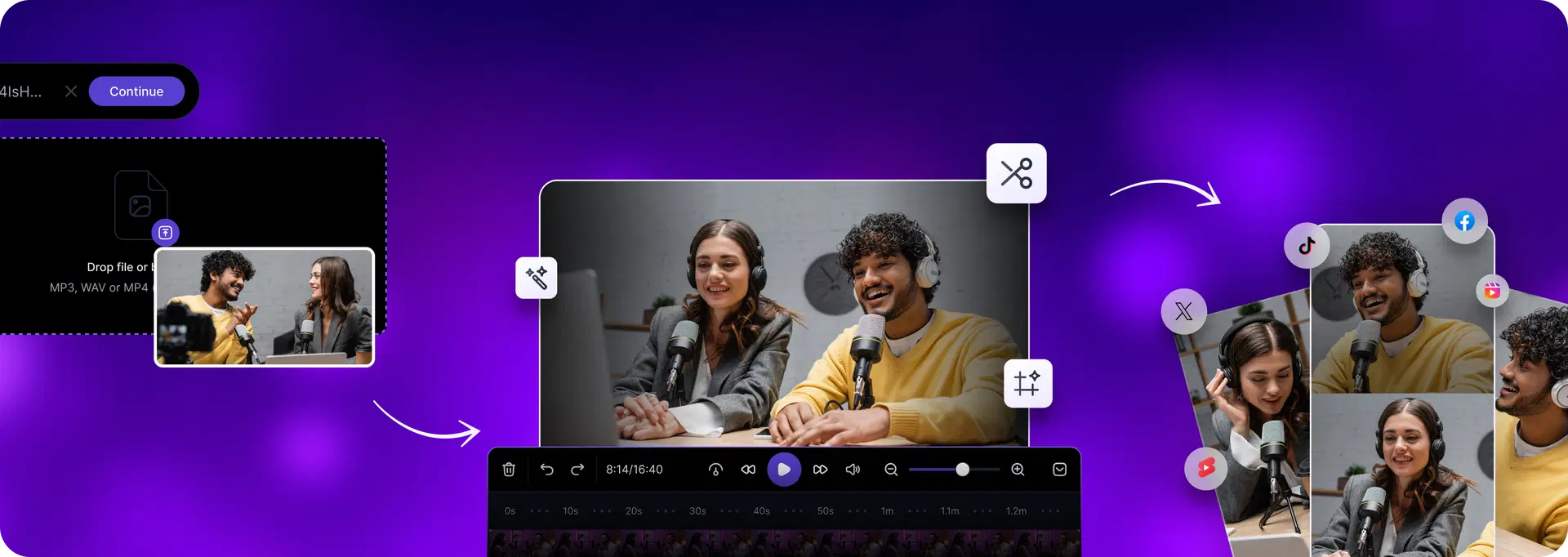
Switching from InVideo to VFX AI gives you more control over visual quality, brand consistency, and multi-platform distribution, while reducing manual editing.
Define your content outcome
Choose what you want VFX AI to create. VFX AI automatically adapts workflows to your goals and platforms, eliminating the need for custom timelines.
Set your brand system
Add logos, fonts, brand colors, and visual rules once inside VFX AI. The platform automatically applies your brand system to every generated video.
Upload your content
Upload long-form videos, webinars, podcasts, product demos, or raw footage directly into VFX AI. AI clip maker repurposes videos into platform-native short-form clips.
Generate cinematic outputs
VFX AI transforms your content into polished, platform-ready videos using automation (captions, trims, and more) without you touching a manual timeline.
Publish everywhere
Use the built-in scheduling system to push content to all your social media channels. No exporting, re-uploading, or juggling within tools.
That's it.
No complex timelines. No layered editing. No platform-by-platform publishing.
Why Teams Switch from InVideo to VFX AI
Need more than just script-to-video generation
Want production quality for social content and ads
Require a consistent brand identity across every asset
Want outcome-based workflows instead of manual editing
Frequently Asked Questions
Common questions about VFX AI vs InVideo.
Is VFX AI better than InVideo?

Is InVideo a good alternative to VFX AI?

Is VFX AI good for agencies and marketing teams?
What is the main difference between VFX AI and InVideo?
Which tool is better for Instagram Reels, TikTok, and Shorts?