Introduction
This shift has opened new possibilities for content creators, marketers, educators, and video professionals who want clean, professional visuals without complex setups. In this blog, we'll explore how AI enables video background removal, why it's becoming the preferred method, and how platforms like VFX AI are shaping the future of AI-driven video editing.
The Problem With Traditional Green Screen Workflows
Green screens were once the gold standard for background removal, but they come with clear limitations. You need controlled lighting, a wrinkle-free screen, and careful wardrobe choices to avoid color spill. Even after all that, results often require manual cleanup, especially around hair and motion-heavy scenes.
This workflow doesn't suit modern creators who need speed, flexibility, and consistency. That's where AI background remover technology steps in, eliminating the need for special equipment altogether.
How AI Removes Background From Video
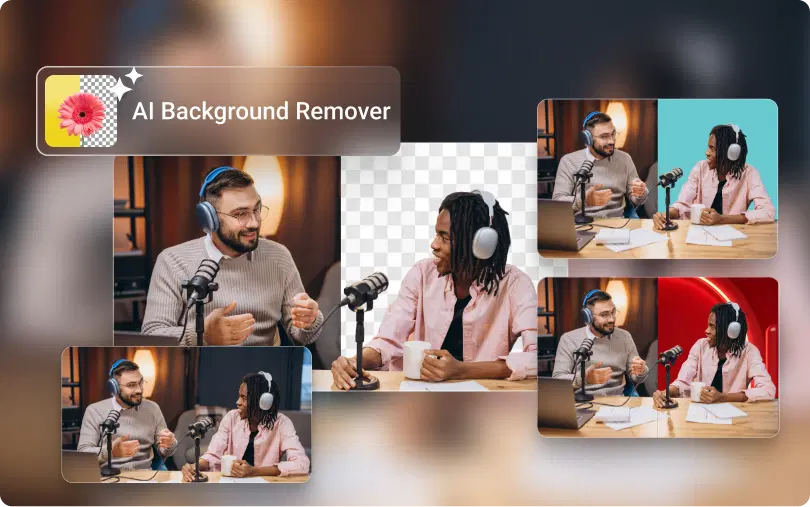
AI background removal works by analyzing each frame of a video and separating the subject from its surroundings. Instead of relying on a single background color, the system understands shapes, depth, edges, and motion patterns. This allows the AI to distinguish people or objects even in complex environments.
In AI video editing, an AI video background remover processes the footage frame by frame, ensuring smooth edges and consistent results throughout the clip. This is why modern tools can handle complex details such as hair, moving hands, and overlapping objects far better than traditional methods.
Because everything happens automatically, users don't need advanced editing skills. What once took hours can now be done in minutes using a BG remover online.
Also Read: How We Converted a 90-Minute Video into 8-10 Shorts Instantly
How to Remove Background From Video
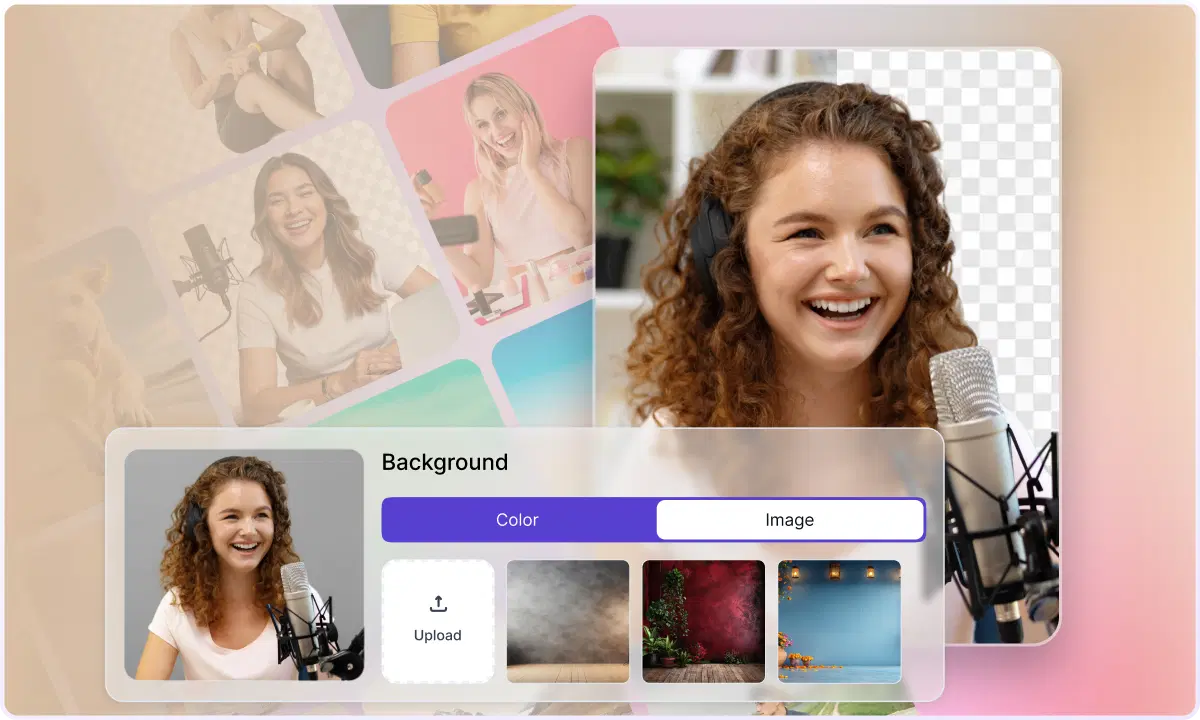
The process is surprisingly simple with the right AI tool. First, you upload your video to an online AI background remover. Most platforms support standard formats like MP4 and MOV. Once uploaded, the AI immediately begins detecting the subject in the video.
After the background is removed, you can decide how you want the final output to look. Some creators choose a transparent background for overlays, while others replace it with images, videos, or branded visuals. This makes background change in videos incredibly flexible, especially for marketing and social media content.
Once you're satisfied, the video can be exported in high quality, ready for publishing or further editing.
Why AI Background Removal Is Becoming the Standard
One of the most significant benefits of using AI background removal is the flexibility it provides. You don't have to be limited to a studio setting or re-shoot footage because of background problems. AI background removal is designed to handle real-world environments, making it perfect for on-the-go shoots or remote settings.
Another significant benefit of AI background removal is the speed it provides. You don't have to manually mask frames as you would with other background removal software. This is especially important for large-scale content production teams. Many of these tools are also completely online, which means you don't have to download massive software or invest in powerful hardware.
For those who value efficiency, a free AI BG remover can be a great starting point, but for professionals, more advanced tools offer higher-resolution, cleaner results.
Also Check: VFX AI Caption Generator
Free AI BG Remover vs Professional AI Tools
Free AI background remover tools are easily accessible and can be very helpful for completing small tasks. They are perfect for testing a workflow or making a quick video. However, they usually come with some limitations, such as watermarks, reduced resolution, or processing limits.
Professional tools are made for continuous high-quality performance. They provide improved edge detection, faster rendering, and greater flexibility in background removal. For businesses, organizations, and professional content creators, using a professional AI background remover tool can save time and deliver higher-quality visuals.
This is where VFX AI BG Remover platforms excel, providing AI precision specifically designed for professional video and VFX production.
Real-World Use Cases for AI Video Background Removal
AI background removal is being used across industries. Content creators use it to clean up distracting environments and maintain a consistent visual style. Marketers rely on it to create multiple ad variations without reshooting footage. Educators use it to produce professional-looking lessons from home setups.
Another growing use case is exporting frames as bg remover PNG files. These transparent images are perfect for thumbnails, posters, and promotional graphics, extending the value of a single video shoot across multiple platforms.
Why VFX AI Fits Modern Video Workflows
VFX AI, AI video editing software, is designed for creators and professionals. Instead of offering a generic background-removal solution, it emphasizes accuracy, speed, and creative freedom. The AI engine in VFX AI is designed for subject separation and is ideal for everything from social media videos to complex VFX work.
By removing technical barriers through background removal, VFX AI enables creators, marketers, and agencies to focus on storytelling and creative expression rather than editing.
AI has fundamentally changed how we approach video editing. The ability to remove background from video without a green screen has made professional-quality visuals accessible to everyone. Whether you're a beginner experimenting with a free AI BG remover or a professional working with advanced tools like VFX AI, AI background removal is now an essential part of modern video workflows.
As AI continues to evolve, tools like VFX AI will play a key role in shaping faster, smarter, and more creative video production.