Introduction
Artificial intelligence is no longer a future concept; it is a present-day reality that is changing everything about how we approach video post-production. It is not just about making things intelligent and automated; it is about changing how processes are done, making them more intelligent and faster. It is no longer a choice for video editors, VFX artists, agencies, and content teams; it is a strategic imperative.
What is AI in Post-Production Workflows?
AI in post-production refers to machine learning technologies used across various stages of the video editing process, including ingest (asset organization), edit (cutting and assembly), VFX (visual effects), audio (mixing and enhancement), and delivery (export and distribution).
Unlike traditional automation, AI systems analyze content contextually. They can recognize scenes, detect objects, understand dialogue, and predict motion, enabling faster and more accurate decision-making throughout the editing process.
This differs from basic automation; it uses intelligent analysis and detection to speed up end-to-end video editing. This means that for a video editor, a VFX artist, or a content agency, it refers to non-destructive enhancements that sit atop tools like Adobe Premiere Pro or DaVinci Resolve.
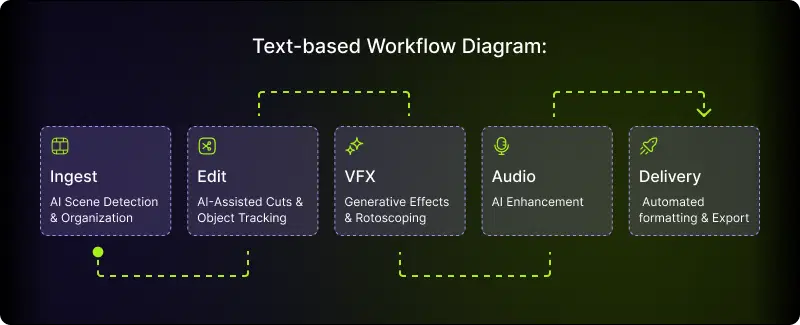
This pipeline reduces friction, enabling faster iteration from raw footage to final output.
Also Read: The Secret to Scroll-Stopping Social Media Videos
Key Areas Where AI is Transforming Post-Production
AI tackles tedious work, resulting in increased speed and quality in video editing, VFX, and content creation.
Automated Rotoscoping & Object Tracking
Rotoscoping and object tracking have been the most difficult processes in post-production, requiring artists to manually identify foreground and background by tracing objects frame by frame.
A simple 10-second scene could take an editor a whole day! However, with AI-powered rotoscoping tools that use motion patterns, edge detection, and depth analysis, artists can get accurate results in a matter of minutes. Tools that use machine learning capabilities can:
- Accurately identify and isolate moving objects
- Predict motion between frames to avoid artifacts
- Manage complex edge cases such as hair and transparent objects
AI-Assisted Editing & Scene Detection
Editors spend considerable time on organizational tasks before even thinking about creative editing, logging footage, identifying usable takes, and building rough assemblies. AI scene detection and content analysis now handles:
- Automatic shot boundary detection: AI recognizes cuts, transitions, and scene changes.
- Content tagging: AI recognizes faces, locations, objects, and actions.
- Quality assessment: AI recognizes out-of-focus shots, poor audio quality, and incorrect lighting.
- Rough assemblies: AI assembles an initial cut based on the script or brief. For documentaries and interview-heavy programs, AI-powered transcriptions with speaker identification enable editors to navigate through hours of footage using search.
Audio Enhancement
Audio post-production is an area where AI technology has seen tremendous improvements:
- Noise reduction: AI-powered ML algorithms separate dialogue from background noise without any artifacts.
- Dialogue Enhancement: AI technology recognizes dialogue and improves its quality in poor-quality recordings.
- Automatic Mixing: AI balances levels, applies EQ, and even suggests master levels.
For content teams dealing with user-generated content, AI-powered audio tools have become an essential part of their toolkit.
Color Grading & Visual Enhancement
Color grading is still an artistic discipline, but AI accelerates the technical foundation:
- Shot matching: AI automatically matches exposure, color, and contrast between shots
- Scene-based grading: AI applies a consistent grade across all the shots in a scene
- Reference matching: AI compares the image with a reference image and applies the same grade
- Upscaling and Enhancing: AI increases the resolution of the image
Colorists use these tools to manage the technical aspects of the image, leaving the creative team with more time for the creative aspects.
Generative VFX & Effects
The newest frontier, generative AI is beginning to impact the effects of work:
- Background generation: AI creates new backgrounds
- Object removal or replacement: AI removes unwanted objects from the image
- Style transfer: AI applies artistic looks or matches visual styles across sequences
- Pre-visualization: AI creates concepts quickly for client approval Generative AI is still in its infancy, but it is starting to be used in effects, speeding up the process, eliminating simple VFX tasks, and enabling concepts that were previously too expensive to try out.
Also Read: AI B-Roll vs. Stock Footage
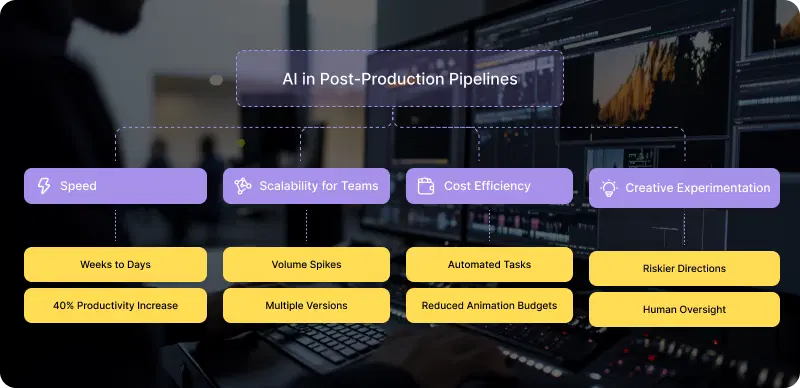
Benefits of AI in Post-Production Pipelines
AI delivers measurable gains:
- Speed: Cuts turnaround time from weeks to days; a study shows a 40% increase in productivity.
- Cost Efficiency: Automates routine tasks, freeing labor; animation budgets decrease with AI/CGI.
- Scalability for Teams: Handles volume spikes; ad agencies use a single asset to generate multiple versions across platforms.
- Creative Experimentation: Enables riskier creative directions, testing different versions with human oversight.
Video editors and VFX artists can be creative instead of routine-oriented.
Challenges & Ethical Considerations
However, AI is not perfect. It also faces certain challenges and disadvantages:
Job Displacement Concerns
It is a valid concern and should not be ignored. Assistant editing, junior roto work, and basic logging are exactly what AI does best. The traditional pathway into post-production is narrowing.
It is important to train people on AI tools, redefine entry-level positions in light of AI supervision and quality control, and help experienced professionals adapt to this change rather than fight it.
Data and IP Risks
Cloud-based AI tools use external servers to process client-provided video data. This is a legitimate concern for any project under an NDA or containing certain types of sensitive content.
It is important to assess the data policies for any AI tool you are considering. You should know where the video is processed and stored, and whether it is used for any type of model training. Many enterprise tools today have an on-premise or private cloud option.
Over-Reliance on Automation
It is important to note that suggestions given by AI may not be entirely correct. The color grades set by AI may need to be checked. AI may also generate matters that require cleaning. This over-reliance on AI may lead to quality issues that affect client relationships.
The professional advantage is not in just using AI, but in knowing how to override it.
How AI Fits into Modern Post-Production Workflows
Okay, here's where things get real.
Firstly, AI tools are not standalone applications. They need to integrate with existing applications, storage solutions, and workflows. A great AI feature is worthless if it breaks your pipeline.
Traditional Workflow vs. AI-Integrated Workflow:
| Stage | Traditional Approach | AI-Integrated Approach |
|---|---|---|
| Ingest | Manual proxy creation, spreadsheet logging | Auto-proxy, AI tagging, searchable metadata |
| Edit | Manual assembly, timeline organization | AI-assisted rough cuts, smart search |
| VFX | Frame-by-frame roto, manual tracking | AI roto with artist refinement |
| Audio | Manual cleanup, full ADR sessions | AI noise reduction, selective ADR |
| Color | Shot-by-shot correction | Batch AI matching, creative focus |
| Review | Manual version tracking, email chains | Automated QC, centralized feedback |
| Delivery | Manual transcoding per platform | AI-optimized delivery specs |
The problem isn't adopting AI, it's setting up AI across your entire workflow. Having five AI tools, each with its own interface, creates new inefficiencies while solving old ones.
This is where the workflow plan comes in. Rather than managing five AI tools with five different interfaces, teams need unified systems that integrate AI tools into their workflows, automate processes, manage assets at every stage, and provide human oversight where needed.
Also Check: VFX AI BG Remover
Future of AI in Post-Production
Artificial intelligence is constantly advancing, and with that comes:
Real-Time Editing: Live editing during shoots, blending pre- and post-production.
Fully Automated Pipelines: Professional-grade AI shortens schedules, defining "AI-native" VFX AI. By the end of 2026, 80% of creators will use AI across their entire workflow, taking it to new heights.
AI as Competitive Advantage
AI in post-production is not a future prospect; it is a current reality. Those studios, agencies, and content producers that are currently embracing this technology are building a competitive advantage that compounds into a future advantage: faster turnarounds, cost savings, and the creative freedom that comes from eliminating the boring. The debate is no longer whether to use AI; it is how to use it effectively without creating a fractured workflow through a series of disconnected tools.
The answer lies in workflow-first thinking systems that adapt AI capabilities across your entire pipeline, rather than isolated features that create as many problems as they solve. If you're evaluating how AI fits into your post-production process, start with the workflow. The tools will follow.