Introduction
Here's why removing cuss words matters so much:
- YouTube monetization rewards advertiser-friendly content. Profanity in the first 30 seconds can limit or demonetize a video.
- Brand safety matters for agencies and businesses sharing client work.
- Educational content for schools and courses needs to stay appropriate.
- Client revisions often include "please clean up the language."
This guide walks you through every method from a simple mute to one-click AI audio editing so you can pick what fits your workflow.
What Does Editing Out Curse Words Mean?
"Removing curse words" isn't one single action. It's a set of techniques you choose based on your video and audience:
- Muting: silencing the exact moment the word is spoken.
- Replacing: swapping the word for room tone or a clean take.
- Beeping: adding the classic censor beep over the word.
- Cutting: removing the clip section entirely with a jump cut.
- AI transcript editing: deleting the word from a text transcript and letting AI update the audio automatically.
Each method has a place. The trick is matching the method to the moment.
Also Check: AI Silence Remover
Why Remove Curse Words?
Clean versions aren't just for TV. Here's where they matter most:
| Context | Why it needs clean audio |
|---|---|
| YouTube | Protects monetization and advertiser trust |
| Brand reputation | Keeps content on-message for sponsors |
| Schools & courses | Meets appropriate-content standards |
| Corporate training | Keeps HR and compliance happy |
| Podcasts | Lets you publish an "explicit-free" edition |
| Business presentations | Keeps client deliverables professional |
| Kids content | Required for family-friendly platforms |
| Facebook, Instagram, TikTok | Avoids reach limits on flagged audio |
Methods to Remove Curse Words
Here are the five reliable ways to censor bad words in a video.
1. Mute Audio
Silencing the audio over the word is the fastest fix.
Pros: Quick, simple, no extra sound effects. Cons: A dead-silent gap can feel abrupt. Best for: Single words in fast dialogue where a tiny gap won't be noticed.
2. Add Beep Sounds
The classic TV approach: a short tone placed over the word.
Beeping signals to viewers that something was intentionally censored, which can actually feel more polished than silence. It's ideal for comedy, reaction videos, and any content where the censorship is part of the tone.
3. Replace Audio
Instead of silence, drop in room tone, the natural background hum of your recording space, over the word. This keeps the audio feeling continuous and natural, with no jarring "hole" in the sound. It's the most seamless option when done well.
4. Cut the Clip
Remove the section containing the word using a jump cut. This works when the surrounding phrase still makes sense without it. Best for talking-head videos where a quick cut looks intentional rather than sloppy.
5. AI Transcript Editing
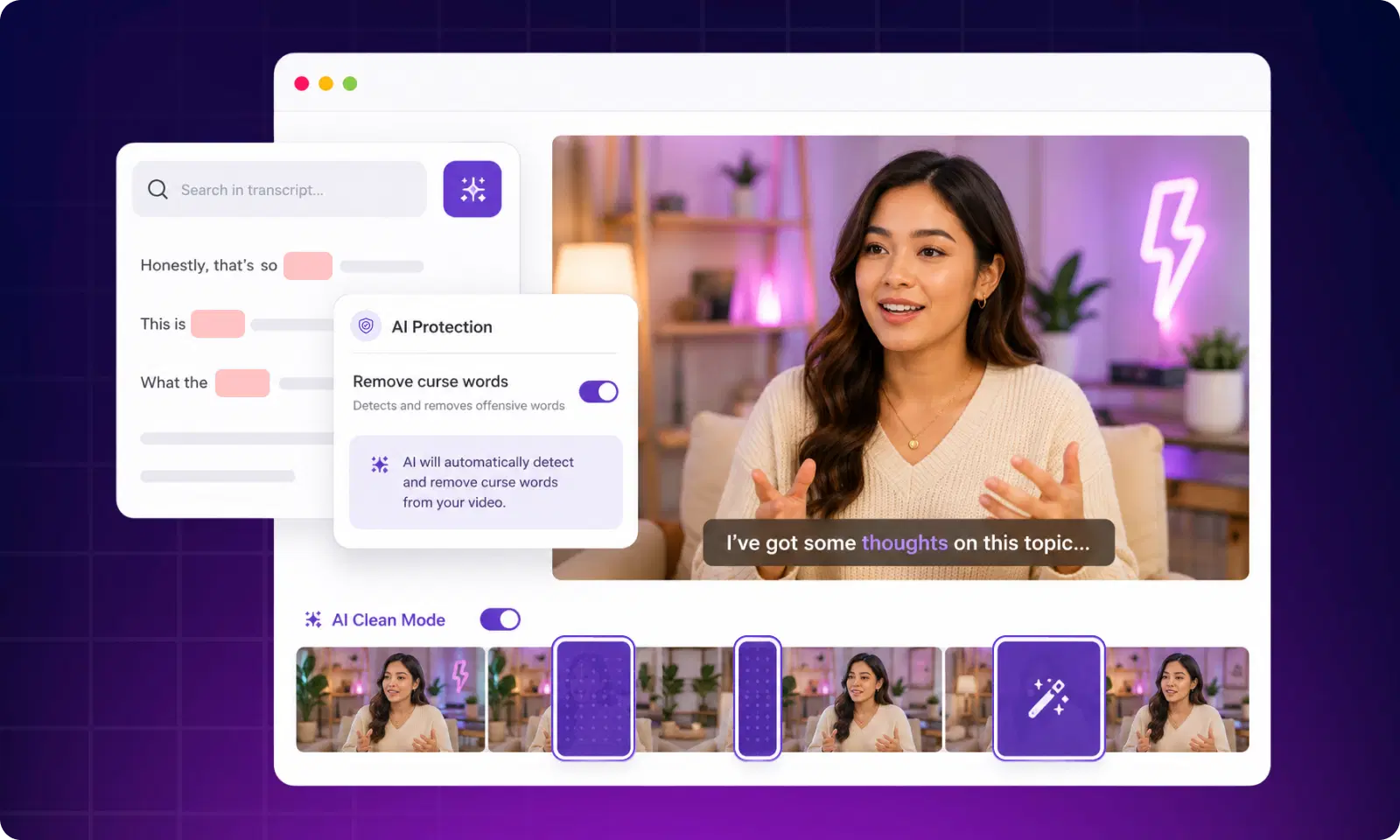
This is the modern shortcut. AI transcribes your video into text, you delete the offending word from the transcript, and the AI edits the underlying audio to match. No waveform hunting, no manual timeline work; you edit words like you'd edit a document.
Also Check: AI Audio Sync
How AI Makes It Easier
Traditional censoring means scrubbing through a waveform, finding the exact spike, and trimming by hand. It's slow and easy to get wrong.
AI collapses that into a few clicks by combining:
- AI transcription and speech recognition to turn speech into editable text
- Timeline detection that maps each word to its exact timestamp
- Automatic silencing or replacement when you remove a word
- Transcript editing so you never touch a waveform
- One-click editing for a much faster workflow
Because the transcript is linked to the audio, editing the text edits the video. That's the leap that makes curse word removal nearly effortless.
Step-by-Step Guide Using VFX AI
VFX AI is an online AI video editor built around exactly this kind of transcript-based workflow. Here's how the process flows:
- Upload your video to VFX AI.
- AI creates a transcript using speech recognition.
- Locate the curse word by searching the transcript text.
- Delete or replace it; the word disappears from the transcript.
- AI updates the timeline and automatically adjusts the audio.
- Export your clean version, ready to publish.
Upload Video → AI Creates Transcript → Locate Curse Word → Delete or Replace → AI Updates Timeline → Export Clean Version
Because everything runs off the transcript, you can clean a 30-minute podcast about as fast as you can read it. The same VFX AI project can also generate your captions and subtitles, so your clean version ships fully finished.
Creator Examples
Different creators face different curse word problems. Here's how each handles it:
- YouTuber: Mutes a single f-bomb in the intro to protect monetization on an otherwise clean video.
- Podcaster: Uses AI transcript editing to publish a "clean" feed alongside the explicit one, no re-recording.
- Instagram Reel creator: Beeps a word so the reel stays advertiser-friendly and avoids reach throttling.
- Online course creator: Replaces a slip with room tone to keep an educational tone.
- Corporate video team: Cuts a bloopered line entirely for a training video.
- Business marketer: Cleans customer testimonial clips before running them as ads.
- Teacher: Prepares a documentary clip so it's appropriate for a classroom.
Also Read: The 30-Day Content Calendar
Common Mistakes
Avoid these frequent slip-ups:
- Muting too much; cutting the words around the curse word too.
- Cutting dialogue that the sentence needs to make sense.
- Poor transitions that leave audible pops or gaps.
- Wrong subtitles leaving the uncensored word in your captions.
- Forgetting captions entirely on the clean version.
- Exporting the wrong version and publishing the uncensored file.
That fourth one is important: if your AI subtitle generator still shows the word on screen, the video isn't actually clean. Always update captions to match the audio.
Why Businesses Need Clean Videos
For companies, clean video is a requirement, not a nice-to-have. It affects:
- Advertising; platforms restrict flagged audio in paid campaigns.
- Training; HR and compliance content must stay professional.
- Client presentations; deliverables reflect on your agency.
- Social media; brand channels can't risk off-message content.
- Brand image; one bad clip can undo months of goodwill.
- Internal communication; company-wide videos need a consistent tone.
- Compliance; regulated industries have strict content standards.
A fast business video editing workflow means teams can turn raw footage into publish-ready assets without a specialist editor on call.
Why AI Video Editing Is the Future
Curse word removal is just one example of a bigger shift. AI video editing is changing how content gets made because it delivers:
- Speed: minutes instead of hours.
- Automation: repetitive tasks handled for you.
- Repurposing: one long video becomes many short clips.
- Better workflow: edit by text, not by timeline.
For the creator economy, that means an AI reel generator can slice highlights, an AI video generator can assemble drafts, and podcast editing that once took a day now takes an hour. Short-form and business content both benefit from the same automated backbone.
You never have to re-record a video just because of a few stray words. Whether you mute, beep, replace, cut, or edit straight from the transcript, you have a clean-up method for every situation.
The fastest path is to let AI do the heavy lifting, transcribing your video, finding the word, and updating the audio and captions in a single workflow. If you want to clean up curse words while keeping professional audio quality, try VFX AI and edit your next video in minutes instead of hours.
The more durable finding isn't simply that AI edits faster. It's that AI-assisted editing can remove much of the repetitive friction sitting between recording a video and reaching a usable edit, while leaving the creative decisions where they belong: with the editor. If editing time is a real bottleneck for your team, the next step is straightforward: test your own workflow, measure it the same way this case study did, and see what the numbers actually show.